English
Tutorial on Trimming Nodes from an ONNX Model
Why node trimming is needed
In general, models include post-processing nodes, and this part is usually computed on the CPU. We strip these nodes out because they can affect quantization quality and may even cause quantization to fail.
Here we use YOLOv5s as an example:
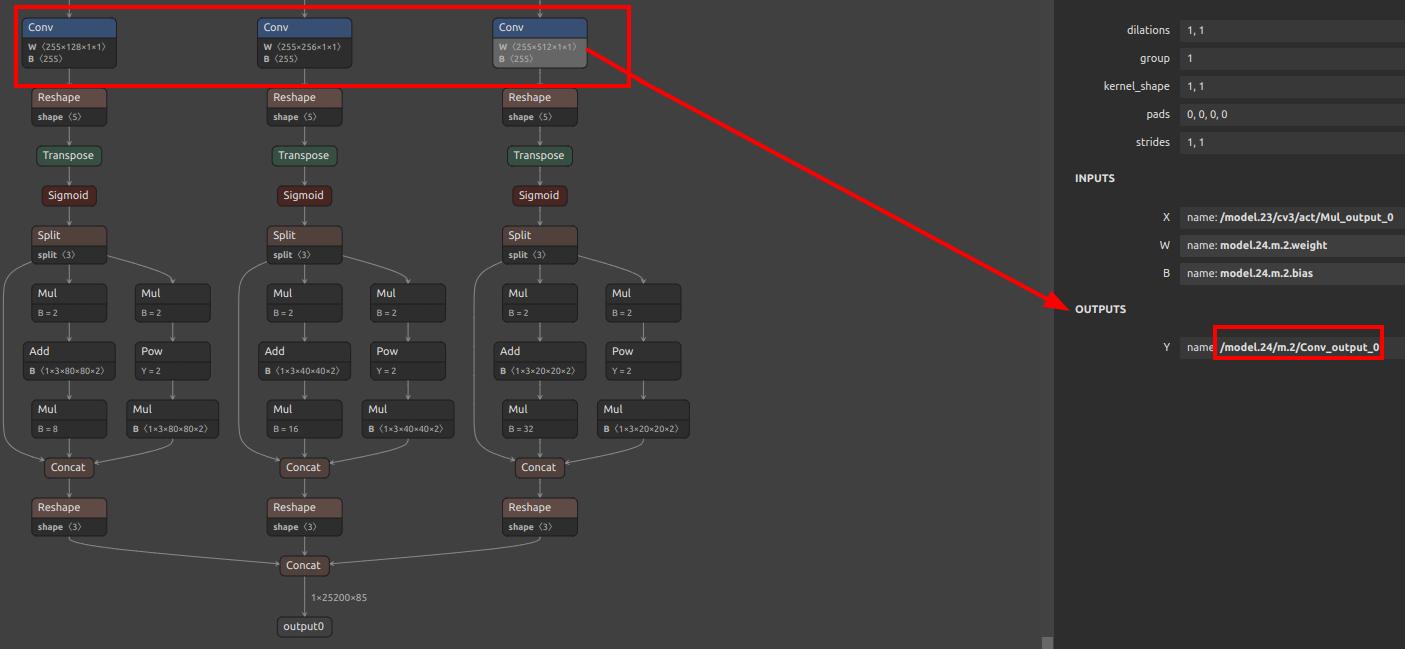
As you can see, there are three conv layers here, and all subsequent computations are handled by the CPU. When quantizing, we use the outputs of these conv layers as the final outputs of the model. Their output names are:
/model.24/m.0/Conv_output_0,/model.24/m.1/Conv_output_0,/model.24/m.2/Conv_output_0.
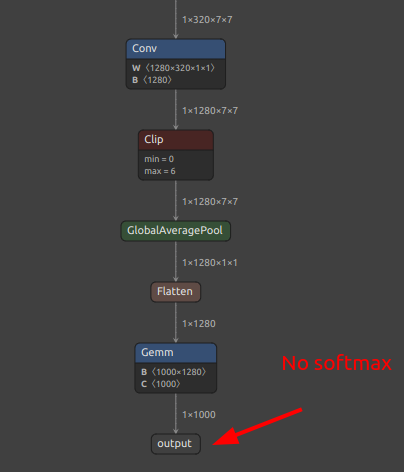
For classification models, generally you only need to use the last output name. However, if there is a softmax, it is recommended not to include softmax in the model, meaning you should use the output name of the layer before softmax. In the figure below, there is no softmax layer, so you can directly use the last layer.
ONNX node trimming script
The core here is the onnx model file. You can extract it using the script extract_onnx.py:
import onnx
import sys

input_path = sys.argv[1]
output_path = sys.argv[2]
input_names_str = sys.argv[3]
output_names_str = sys.argv[4]
input_names = []
for s in input_names_str.split(","):
    input_names.append(s.strip())
output_names = []
for s in output_names_str.split(","):
    output_names.append(s.strip())
onnx.utils.extract_model(input_path, output_path, input_names, output_names)
No further explanation of the Python script is needed here. Just place it in any folder and run:
python extract_onnx.py $model_path $onnx_extracted $input_names $output_names
Or, if you do not want to save the script as a file, you can run this directly:
python -c "import onnx,sys; onnx.utils.extract_model(sys.argv[1], sys.argv[2], [s.strip() for s in sys.argv[3].split(',')], [s.strip() for s in sys.argv[4].split(',')])" yolo11n.onnx export.onnx "images" "/model.23/Concat_output_0,/model.23/Concat_1_output_0,/model.23/Concat_2_output_0"
Replace
yolo11n.onnx,export.onnx,"images", and"/model.23/Concat_output_0,/model.23/Concat_1_output_0,/model.23/Concat_2_output_0"with your$model_path,$onnx_extracted,$input_names, and$output_namesrespectively.
At this point, the generated export.onnx is the final trimmed ONNX file. You can then continue with your deployment.
For MaixCAM / MaixCAM-Pro model conversion, see the MaixCAM model conversion documentation
For MaixCAM2 model conversion, see the MaixCAM2 model conversion documentation